Workout log: how to keep one, plus a free template
What to write down after every set, how to tell from your entries that you're progressing, and what to log in — a notebook, a spreadsheet or an app. A free Excel and PDF template is at the end.
Why keep a workout log
A month into training, almost nobody remembers what they squatted three weeks ago or how many pull-ups they managed. Without those numbers you can't decide what to do next session: add weight, repeat, or back off. A log solves this — before each set you look at the last entry and know your starting point.
What a log gives you in practice:
- Progress becomes visible. Going from 50 to 62.5 kg on the bench over two months is hard to feel, but obvious on paper. That is the best motivation to keep going.
- Workouts stop being random. You walk into the gym with "bench 3×8 at 52.5 kg", not "do some stuff".
- You see what isn't working. If a lift is stuck for four or five sessions, it's a signal to change the program, sleep or food — not just to "try harder".
- Consistency stays in check. Missed sessions are obvious when workouts are listed by date.
- Fewer injuries. A note like "shoulder twinged on the last rep" reminds you to drop the weight next time.
What to record
Six columns are enough: date, exercise, set, weight, reps and a note. Everything else is calculated from them.
- Exercise. Always use the same name: "Bench press", not "bench" one day and "chest" the next — otherwise you can't compare entries a month later. You can check names and technique in the exercise library.
- Set. One row per set. That shows exactly where reps drop off: on the second set or only on the last.
- Weight. The working weight in kilograms. For dumbbells, write the weight of one dumbbell; for pull-ups and push-ups, write 0 or the added load. What matters is one rule for the whole log.
- Reps. How many reps you did in the set. For planks and other holds, write seconds.
- How it felt. A few words in the note: "slept badly", "easy", "knee hurts". After a couple of months these notes show what holds your progress back.
- RPE — rate of perceived exertion on a 1–10 scale. 10 is failure, not a single rep left; 9 means one rep in reserve; 8 — two. RPE helps decide when to add weight: if 70 kg felt like RPE 7 last time, try 72.5 today.
Warm-up sets are optional, but if you log them, mark them in the note so they don't inflate your volume.
Example of one logged workout
| Date | Exercise | Set | Weight, kg | Reps | Note |
|---|---|---|---|---|---|
| Oct 6 | Barbell squat | 1 | 70 | 6 | RPE 7 |
| Oct 6 | Barbell squat | 2 | 70 | 6 | RPE 8 |
| Oct 6 | Bench press | 1 | 50 | 8 | RPE 7 |
| Oct 6 | Bench press | 2 | 50 | 7 | RPE 9, last rep was hard |
From an entry like this the next session plans itself: both squat sets had reps in reserve, so try 72.5 kg; the second bench set fell short, so stay at 50 kg and work up to 8 reps.
Common mistakes
- Logging from memory in the evening. A few hours later weights and reps get mixed up. Write each set down right away while you rest.
- Recording only your best set. Then you can't see how you fatigue towards the end, and it's hard to tell when to add weight.
- Changing exercises every week. Progress only shows if an exercise stays in the program for at least 4–6 weeks.
- Logging for the sake of logging. Entries exist to decide what to do today. If you never look at them, cut the columns down to the minimum.
How to track progress from your entries
A log is only useful if you check it before training and draw conclusions. Three methods that work for most people.
Progressive overload
Strength and muscle grow when you gradually do more than last time. The simplest scheme is double progression: pick a rep range, say 6–8. Until you hit 8 reps on every set, keep the weight and add a rep. Once you get 3×8, add 2.5 kg (5 kg is fine for leg lifts) and start again at 6 reps. A log is essential here: you can't remember the reps of every set without one.
Volume (tonnage)
Volume is the sum of weight × reps over all sets. Three sets of 8 with 60 kg is 1,440 kg. Compare volume for one exercise or muscle group week to week: slow growth is normal progress, a sudden jump means watch your recovery, and a drop for several weeks points to fatigue or missed sessions.
Personal records
Mark your records: the heaviest weight for 1, 5 or 8 reps, the most bodyweight reps. To compare sets with different rep counts, convert them to an estimated one-rep max with the 1RM calculator. A few percent of 1RM growth per month is a good result in your first year or two.
Paper, Excel or an app
Each option has its strengths; pick the one you will actually use.
| Notebook or printout | Excel / Google Sheets | App | |
|---|---|---|---|
| Logging in the gym | Quick with a pen, but you need the notebook | Awkward on a phone: tiny cells | A couple of taps on your phone |
| Past results | Flip through pages | Filter by exercise | History and charts per exercise |
| Volume and records | Calculate by hand | Needs formulas | Calculated for you |
| Progress charts | None | Possible, by hand | Built for you |
| Reliability | Easy to lose | File may live on one device | Stored in your account, with export |
| Cost and learning curve | Almost free | Free | Often free, takes getting used to |
Paper is great if you don't want your phone out while training — print the PDF template below. Excel suits people who like to do the maths and build their own pivot tables. An app saves you the arithmetic: exercise history, volume, max weights and charts appear without formulas. Many people combine them: start with a spreadsheet, then move the history to an app when it grows.
If you don't know what to do in the gym yet, start with a ready-made training plan — tracking progress on a program is much easier.
Workout log template: Excel and PDF
Same columns as in the article: date, exercise, set, weight, reps, note. The Excel version has a frozen header, 200 rows with number validation and a “How to fill in” sheet with an example. The PDF is four A4 pages for a month, one week per page, with space for weekly totals and records.
Free, no sign-up needed.
Online is easier: charts and the calendar update themselves
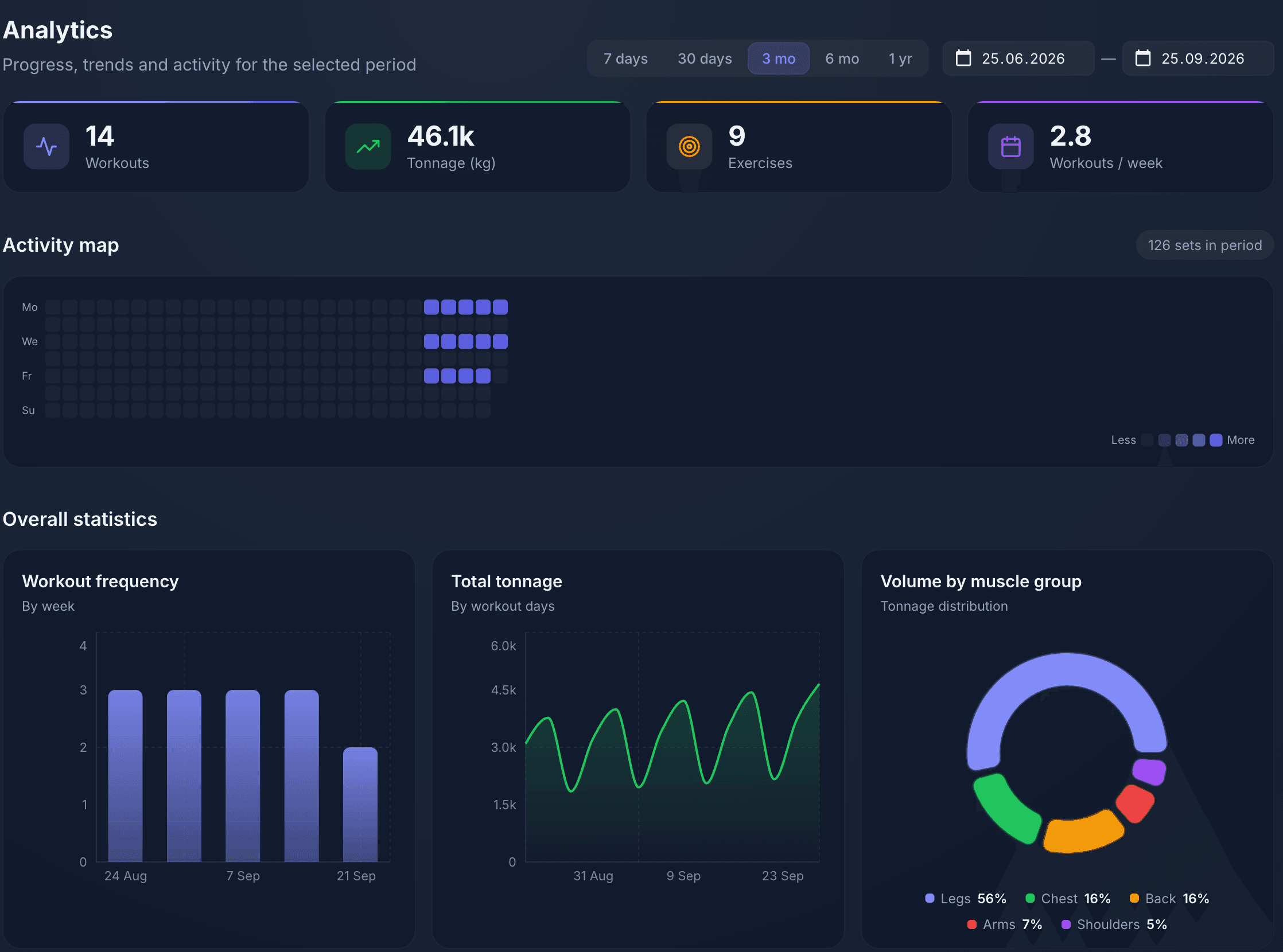
In Workouter you log the same things — exercise, sets, weight, reps — from your phone in the gym, and everything a spreadsheet would need formulas for appears on its own.
- Volume, max weight and progress charts are built for every exercise
- An activity map and weekly frequency show your consistency at a glance
- Workouts land on a calendar, so gaps and the week ahead are visible
- Start without signing up and export your history to Excel or PDF
Free, runs in the browser on desktop and phone.
FAQ
What should I record in a workout log?
At minimum: date, exercise, set number, weight and reps. A note is useful too — how you felt and the effort of the set (RPE from 1 to 10). That is enough to calculate volume, track records and decide when to add weight.
Do I need to log every workout?
Yes, otherwise there is nothing to compare: progress only shows on a continuous history. Log in the gym between sets — by evening the details are gone. Warm-up sets can be skipped or marked in the note.
How do I calculate workout volume?
Multiply weight by reps for each set and add the results. For example, 3 sets of 8 reps with 60 kg is 1,440 kg. In Excel, add a column with =D2*E2 and sum it; an app calculates volume automatically.
Which is better: an Excel log or an app?
Excel is free and flexible, but awkward to fill in on a phone at the gym, and charts and volume need formulas. An app is faster to log in and tracks progress for you. If unsure, start with the Excel template and move to an app once your history grows.
Can I print the workout log template?
Yes, the PDF is made for A4 printing: four pages per month, one per week, with fields for weekly totals and personal records. The Excel template prints too — the header repeats on every page.
What is RPE and why record it?
RPE is a subjective 1–10 rating of how hard a set was: 10 is failure, 9 means one rep left in reserve, 8 — two. It shows whether a set was at your limit. If RPE drops at the same weight, it's time to increase the load.